After installation and doctor, use this guide to run agents in tmux, inspect their status and restore sessions.
Run each agent in its own tmux pane
Give each agent its own tmux pane so gtmux can focus it and send replies. Hooks can also provide read-only status for agents outside tmux. After installing and signing in to the agent CLIs, create a named session:
tmux new -s api 'claude'Detach with Ctrl-b d, or open another terminal window, before starting the next one:
tmux new -s docs 'codex'A tmux session and its agents can keep running when you close the terminal, lose SSH or unplug a display. Session names and pane IDs help you locate each agent.
After a reboot, gtmux restore rebuilds the sessions and layout from the latest tmux-resurrect snapshot. Programs start as new processes; by default, agents that support conversation recovery resume their saved conversations. Use gtmux doctor to configure snapshots.
A MacBook normally sleeps when its lid closes; gtmux awake on keeps it running. For tmux basics, see the official Getting Started guide.
Put your agents on the radar
Install a hook once for each agent you use. It reports turn and approval state directly; Copilot and Kiro need it to appear on the radar. Some other agents can also be detected from their process and screen:
gtmux install hooks --agent claude
gtmux install hooks --agent codex
Without --agent it sets up Claude Code only. Repeat for the agents you use: gemini,
cursor, opencode, kimi, copilot or kiro. An agent that was already running picks
the hook up after a restart. gtmux doctor --fix offers hooks for supported installed agents. You can also use gtmux install hooks --agent auto; see agent setup for each integration’s loading requirements.
For agents with process detection, gtmux can read fallback state without a hook from the pane title, screen and CPU sampling, with less detail (a live Codex approval menu still shows as waiting). Visibility outside tmux depends on each agent’s hooks and history reader.
Open the radar
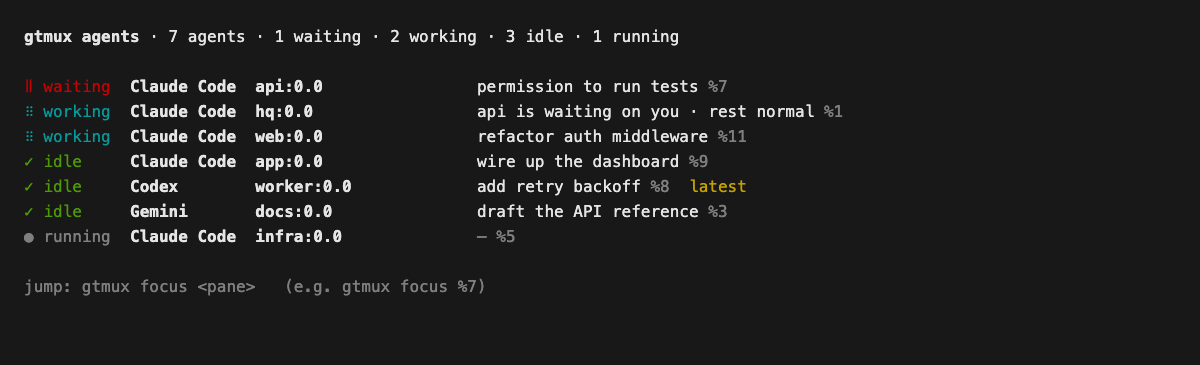
gtmux agents --watch # a live dashboard in your terminal; ↑/↓ select, Enter jumpsOr keep it in view: the menu-bar app (installed by the install script, or
brew install --cask chenchaoyi/tap/gtmux-app) shows a status dot, opens a palette with
⌘⌥G, and posts a notification when an agent needs you. The iPhone and iPad app shows the
same radar. See Manage from your phone and the web.
See every tmux pane
gtmux panes lists all tmux panes, including agents, shells, editors and dev servers. In the apps, open All panes.
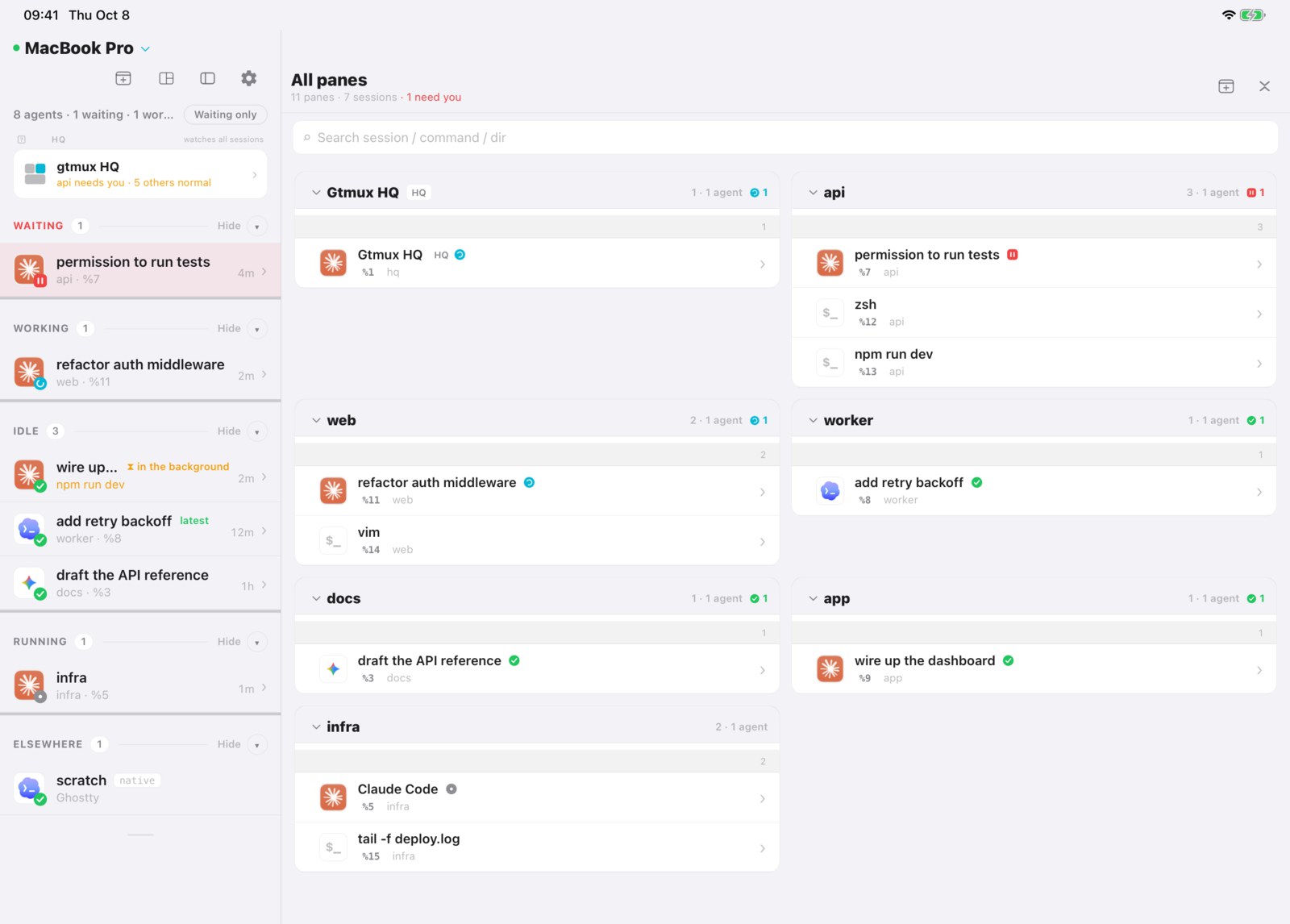
Jump to the one that is waiting
gtmux focus %7 # bring that pane's window and pane to the frontClicking an agent in the menu-bar panel or opening its notification also brings its terminal window and pane forward so you can reply. Focus supports Ghostty 1.3+, iTerm2 and cmux; Warp support is best effort. It also requires tmux’s set-titles option, which gtmux doctor can configure (gtmux focus).
On the Mac, ⌥⌘4 captures an image for an agent. An open menu-bar panel stays in the capture so you can frame the panel itself; Esc cancels and keeps it open. In the editor, Return adds a new line to the note and ⌘↩ sends. Resizing the window scales the image and its marks together; the exported screenshot keeps its original pixel size.
Related guides: Coordinate tasks with HQ · Manage from your phone and the web · CLI reference
Source: docs/guides/watch-a-fleet.md at a457c28 · Edit on GitHub
完成安装和 doctor 配置后,按本指南启动 agent、查看状态及恢复会话。
每个 agent 跑在自己的 tmux pane 里
每个 agent 使用独立的 tmux pane,才能通过 gtmux 跳转和回复。tmux 外的 agent 也可通过 hook 提供只读状态。安装并登录 agent CLI 后,先创建一个命名会话:
tmux new -s api 'claude'按 Ctrl-b d 脱离这个会话,或者另开一个终端窗口,再起下一个:
tmux new -s docs 'codex'关闭终端窗口、断开 SSH 或拔掉显示器后,tmux 会话和其中的 agent 仍可继续运行。会话名称和 pane ID 用于定位各个 agent。
重启后,gtmux restore 从最近保存的 tmux-resurrect 快照重建会话和布局;程序会作为新进程启动,支持恢复对话的 agent 默认续接原对话。gtmux doctor 可配置快照保存。
MacBook 合盖默认休眠,gtmux awake on 可让它继续运行。tmux 基础操作见官方 Getting Started。
让 agent 上雷达
每种使用的 agent 安装一次 hook,直接报告回合和审批状态。Copilot 和 Kiro 需要 hook 才能出现在雷达上;部分其他 agent 也能从进程和屏幕识别:
gtmux install hooks --agent claude
gtmux install hooks --agent codex
不加 --agent 只配 Claude Code。你用哪些就接着配哪些:gemini、cursor、opencode、kimi、copilot 或 kiro。已经在跑的 agent 重启后才会用上 hook。gtmux doctor --fix 会为本机已安装且受支持的 agent 提出 hook 配置,也可用 gtmux install hooks --agent auto。各自的加载要求见 Agent 接入。
支持进程识别的 agent 不装 hook 时,gtmux 从 pane 标题、屏幕和 CPU 采样读取回退状态,细节少一些(Codex 正在弹的审批菜单仍会显示为等待)。tmux 外的可见范围取决于各 agent 的 hook 和历史读取支持。
打开雷达
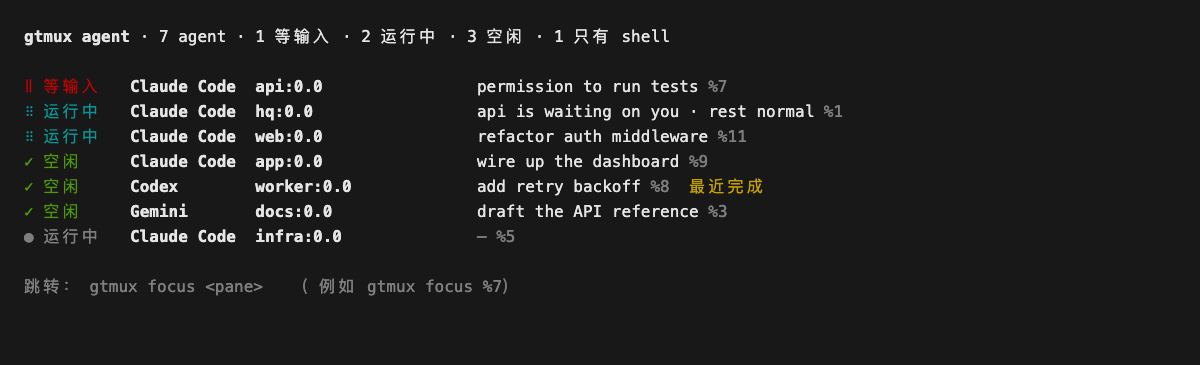
gtmux agents --watch # 终端里的实时看板;↑/↓ 选择,回车跳过去或者让它常驻:菜单栏 app(安装脚本会一起装,也可以 brew install --cask chenchaoyi/tap/gtmux-app)在菜单栏放一个状态点,⌘⌥G 唤出面板,有 agent 等你时发通知。iPhone 和 iPad app 上是同一块雷达,见用手机和网页远程管理。
查看所有 pane
gtmux panes 列出所有 tmux pane,包括 agent、shell、编辑器和开发服务器。App 中对应的入口是「所有 pane」。
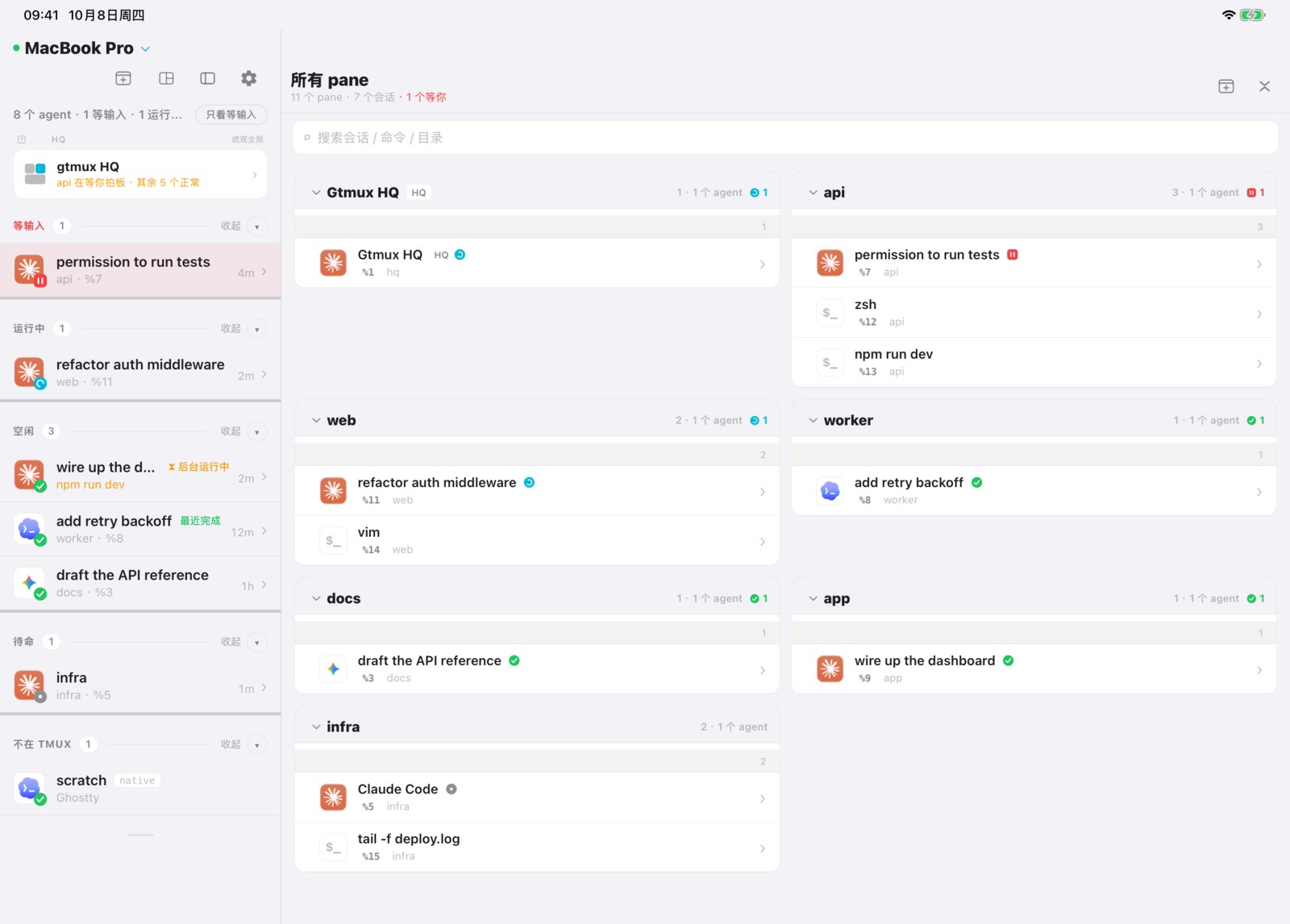
跳到在等你的那个
gtmux focus %7 # 把那个 pane 所在的窗口和 pane 带到最前点击菜单栏中的 agent 或通知,也能将对应的终端窗口和 pane 切到前台,然后输入回复。跳转支持 Ghostty 1.3+、iTerm2 和 cmux;Warp 为尽力支持。tmux 还需开启 set-titles,可通过 gtmux doctor 配置(gtmux focus)。
Mac 上按 ⌥⌘4 可截图发给 agent。已展开的菜单栏面板会保留在截图里,可以直接框选面板本身;按 Esc 取消后仍保持展开。编辑页的附言框支持回车换行,⌘↩发送;调整窗口时,截图和标注一起等比缩放,导出仍保留原始像素尺寸。
相关指南:使用 HQ 协调任务 · 用手机和网页远程管理 · CLI 参考
来源:docs/guides/watch-a-fleet.zh.md(a457c28)· 在 GitHub 上编辑