gtmux shows which coding agents in tmux are working, waiting for a reply or finished. Open a session on your Mac, or continue from your phone, iPad, browser or another terminal. Existing tmux sessions are detected; agents do not need to be launched through gtmux.
New here? Follow the three steps below on the computer running your agents. Then choose an interface for everyday work.
Get connected
1. Download and install
On a Mac, use the official installer to get both the CLI and the menu-bar app:
curl -fsSL https://ccy.dev/gtmux/install | bashIn mainland China, use https://ccy.pub/gtmux/install in the same command. Both domains provide the same signed releases. The installer verifies the release metadata and packages, installs the CLI in ~/.local/bin and opens the app. If gtmux is not found afterwards, follow the installer’s PATH instructions.
For Homebrew, individual downloads, pinned versions or CLI-only installation, see install options.
You also need tmux and an installed, signed-in coding agent. On macOS, brew install tmux installs tmux. The CLI/server supports macOS and Linux on amd64/arm64; the menu-bar app, desktop focus and lid controls require macOS.
2. Configure with doctor
In your Mac’s terminal, run:
gtmux doctorIt checks your environment first. If repairs are available, answer Review available repairs now? to walk through them, or run gtmux doctor --fix directly. Each step explains its change and asks before applying it. Depending on what is missing, it configures tmux titles, session snapshots and autosave, hooks for installed agents, and the menu-bar app. Permissions or dependencies that need a separate action remain in the report.
If no tmux server is running, start a session with tmux new -s work, then retry the repair from there. Run gtmux doctor again afterwards: resolve ✗ failures first, review ⚠ recommendations for the features you use, and look for ✓ on the relevant checks. A hook marked Configured takes effect when the agent next starts; it does not restart running agents. Doctor details and troubleshooting.
3. Connect your phone or browser
Keep the host awake and connected. For access outside your local network, run this on the Mac and leave it running:
gtmux tunnelOn first use, follow its prompts to install the optional tunnel client if needed. It starts the required server and prints a pairing QR. If you only need the same local network, use gtmux serve instead, then run gtmux pair in a second terminal for the QR. For an existing connection, gtmux pair also generates a fresh code. Each code works once and expires after five minutes.
On your iPhone or iPad, install gtmux from the App Store, then tap Add a server → Scan pairing QR. Scan the Mac’s QR and open the saved server. Seeing its radar confirms the connection. To connect your own browser, open the browser link printed by gtmux pair; generate another code for each device.
You can also enable access through Preferences → Remote access in the Mac menu-bar app and open Pair a device…. Choose Local network for devices that can reach each other, or Anywhere for other networks. Connection methods and fixes explain blocked networks, persistent access and notification requirements. Pair your own devices; give collaborators a scoped Share link.
Use gtmux
Open any screenshot to view it at full size.
Terminal: inspect and attach
Use the terminal when you want a compact status list or a full tmux session. Run each agent in its own pane, for example tmux new -s api 'claude', then open another terminal for the radar:
gtmux agents --watchSelect a row with ↑/↓ and press Enter to open its pane. Red means waiting for you, cyan working, green idle, and grey an agent whose turn state is unknown. Desktop focus supports Ghostty 1.3+, iTerm2 and cmux; Warp is best effort. Run agents, read status and restore sessions.
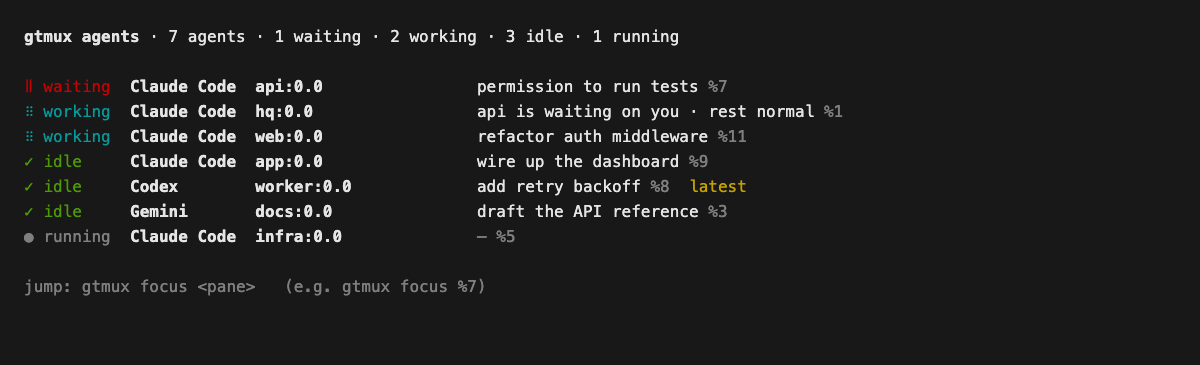
Text version of the terminal example
gtmux agents · 7 agents · 1 waiting · 2 working · 3 idle · 1 running

‖ waiting  Claude Code  api:0.0                permission to run tests %7
⠿ working  Claude Code  hq:0.0                 api is waiting on you · rest normal %1
⠿ working  Claude Code  web:0.0                refactor auth middleware %11
✓ idle     Claude Code  app:0.0                wire up the dashboard %9
✓ idle     Codex        worker:0.0             add retry backoff %8  latest
✓ idle     Gemini       docs:0.0               draft the API reference %3
● running  Claude Code  infra:0.0              — %5

jump: gtmux focus <pane>   (e.g. gtmux focus %7)
To work from another computer, install the CLI there and run the gtmux attach '…' command printed by gtmux pair on the host. Later, use gtmux attach <host> and choose a pane. Detach with Ctrl-] or tmux’s Ctrl-b d; the remote session keeps running. Remote terminal walkthrough.
For a summary across sessions, run gtmux digest. To have an agent coordinate tasks, start gtmux hq; it uses one of your installed agent CLIs and its account. Coordinate work with HQ.
Mac menu bar: open the session that needs you
Run gtmux app, then click its menu-bar mark or press ⌘⌥G. Select a tmux agent to open its terminal pane. Desktop notifications also open the matching pane; the app must be running and macOS must allow notifications.
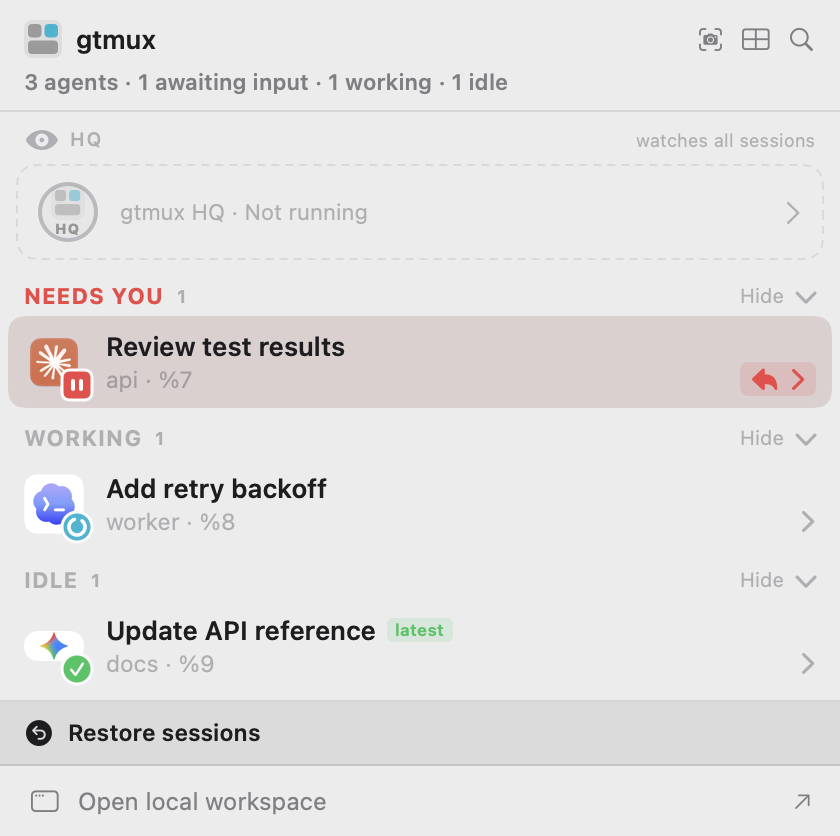
The image shows the native menu-bar view with example sessions, captured on 2026-10-30. The bottom action opens the local browser workspace. ⌥⌘4 captures an image you can annotate and send to an agent. Menu-bar actions and session focus.
iPhone: reply away from your desk
After connecting your device, tap an agent on the radar to read its conversation or terminal. Choose an offered reply or write your own. Enable iOS notifications to receive alerts when an agent needs you or finishes.
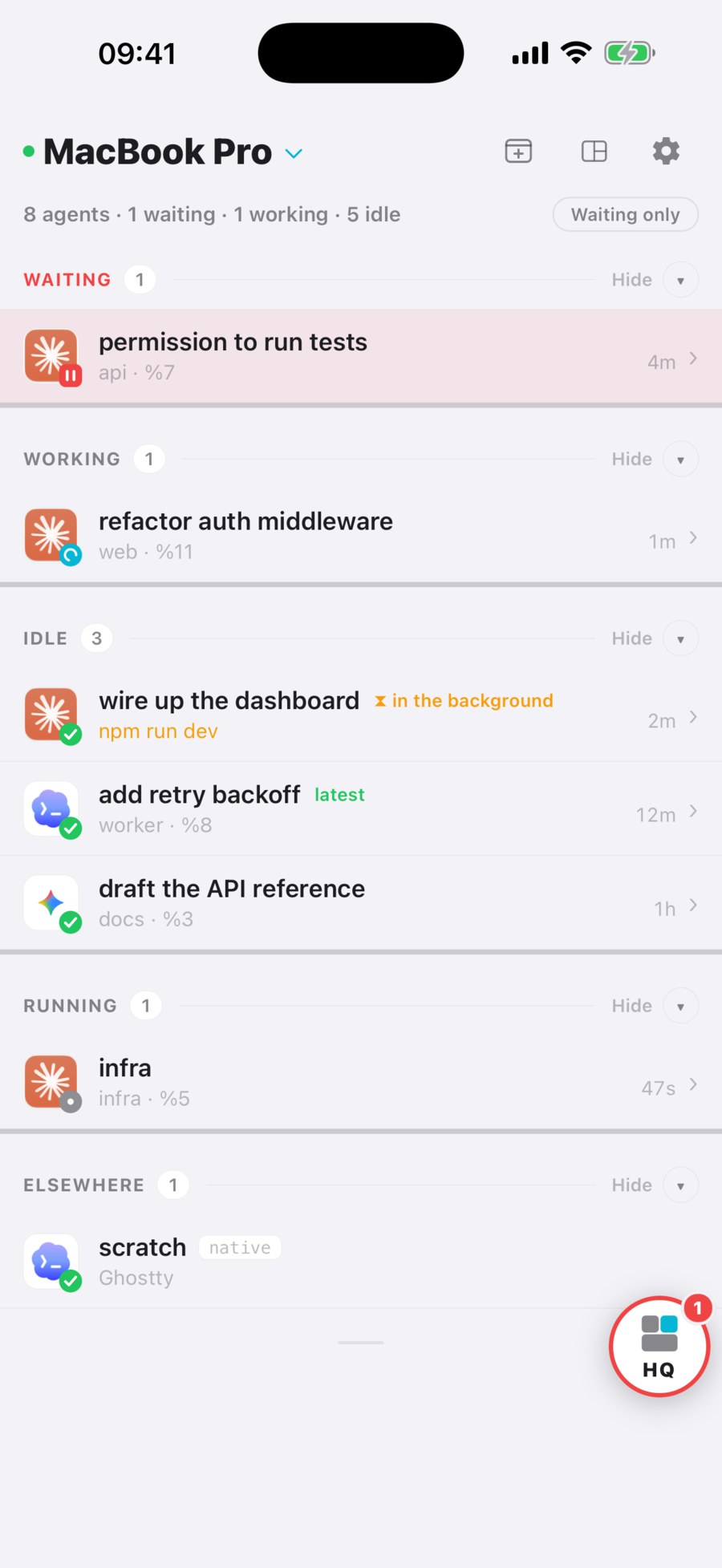
Phone controls, notifications and sharing cover replies, attachments and access for collaborators.
iPad: keep sessions side by side
Install the same App Store app and pair the iPad with its own fresh QR. In a wide window, keep the radar in the sidebar and select sessions in the main area. Open All panes to include shells and editors. Narrow windows use the phone layout.
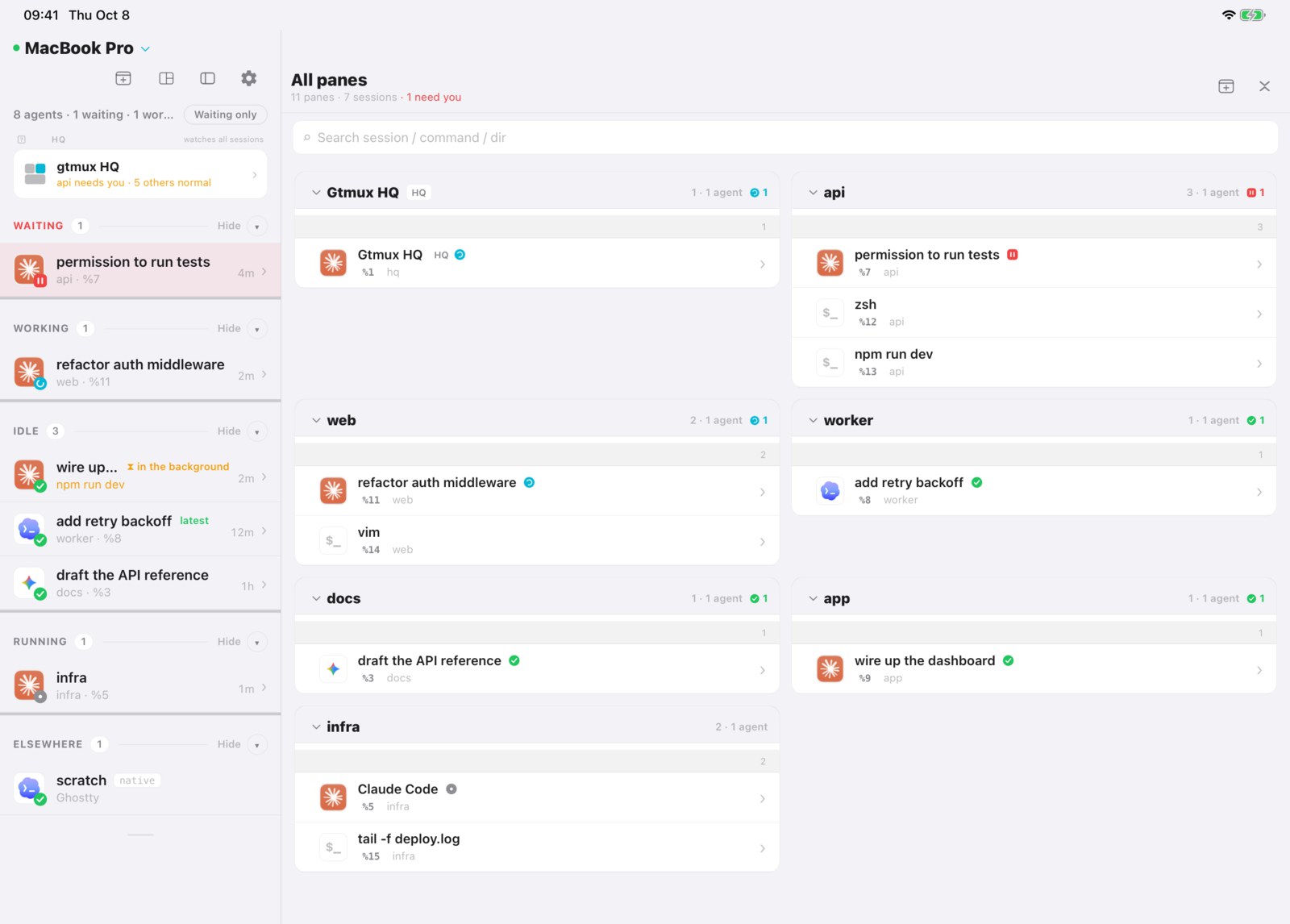
The app guide explains the shared controls. The iPhone and iPad images use example sessions captured in the app simulator on 2026-10-08.
Web: open the workspace in a browser
On your Mac, choose Open local workspace at the bottom of the menu-bar panel. It opens a paired browser on this Mac without a tunnel. From another device, open the fresh browser pairing link from step 3.
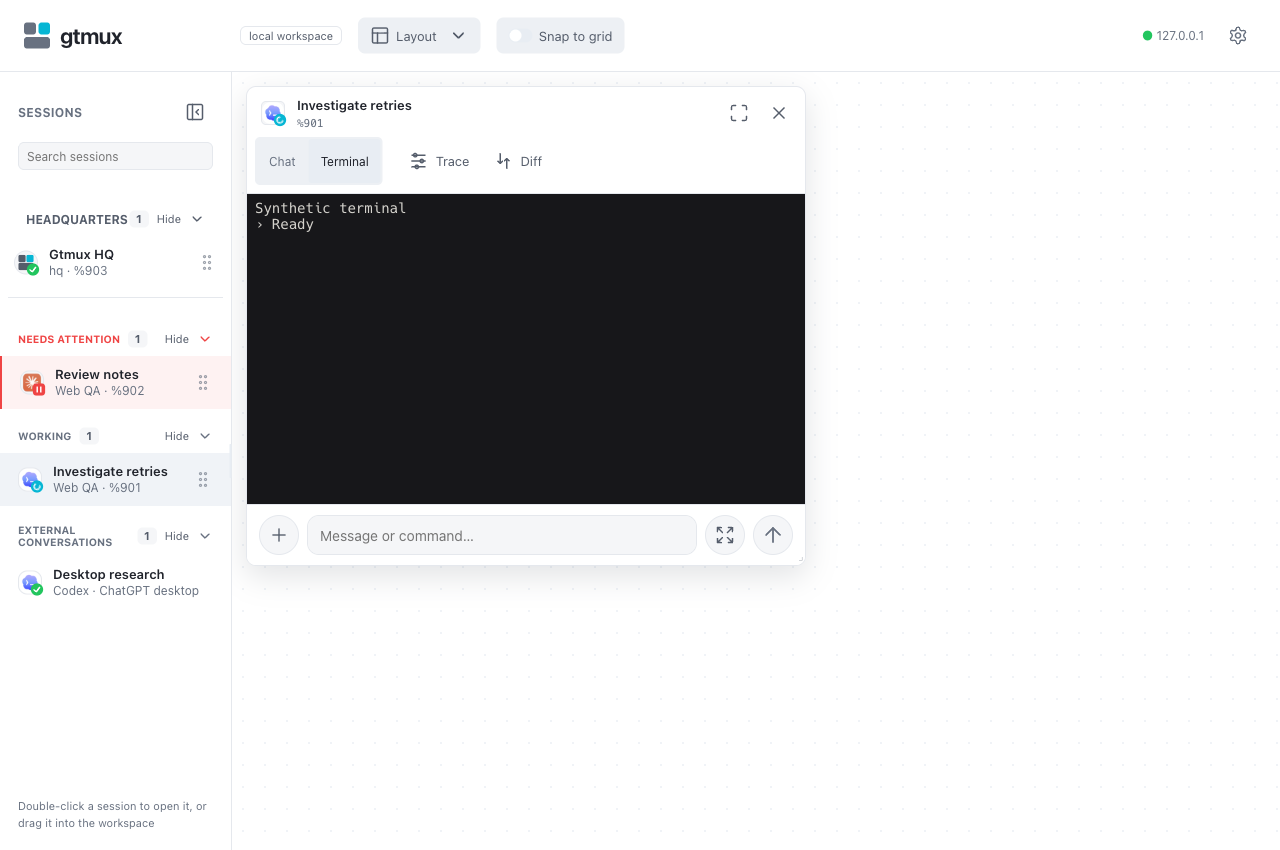
Double-click a tmux row or drag it onto the board. Choose Chat, Terminal or Trace for that session. Enter adds a line; Ctrl/Cmd+Enter sends. External sessions can be read where supported but do not accept pane input. Browser controls and layout.
Reference
- Install, update and uninstall: PATH, Homebrew, pinned versions and moving to a new Mac.
- Connection troubleshooting: network choices, persistent tunnels, pairing, permissions and push delivery.
- Agent setup and support: hooks, history readers and each agent’s limits.
- CLI reference: command options, language and persistent settings.
- HQ knowledge base: records, knowledge and your own rules.
- DeepSeek Harness setup: terminal and history integration.
For development, see CONTRIBUTING.md and the design documents.
License
MIT © ccy
Source: README.md at a457c28 · Edit on GitHub
gtmux 集中显示 tmux 中 coding agent 的状态:正在工作、等待回复或已经完成。你可以在 Mac 上打开对应会话,也可以从手机、iPad、浏览器或另一台电脑的终端继续操作。已有的 tmux 会话会自动识别,无需通过 gtmux 启动 agent。
第一次使用,先在运行 agent 的电脑上完成下面三步,再选择日常使用的入口。
安装并连接
1. 下载并安装
在 Mac 终端运行官方安装器,同时安装 CLI 和菜单栏 App:
curl -fsSL https://ccy.pub/gtmux/install | bash也可将命令中的地址换成 https://ccy.dev/gtmux/install,两个入口提供同一套签名发行包。安装器会验证发行清单和文件,把 CLI 装到 ~/.local/bin,并打开菜单栏 App。装完找不到 gtmux 时,按安装器提示将该目录加入 PATH。
使用 Homebrew、手动下载、指定版本或只安装 CLI,见安装选项。
还需要 tmux,以及已安装、已登录的 coding agent。macOS 可用 brew install tmux 安装 tmux。CLI/服务端支持 macOS 和 Linux 的 amd64、arm64;菜单栏 App、桌面跳转和合盖控制仅适用于 macOS。
2. 用 doctor 配置
安装后,在 Mac 终端运行:
gtmux doctordoctor 先检查环境。有可修复项时,回答「现在查看可修复项?」后逐项配置;也可直接运行 gtmux doctor --fix。每一步都会先解释改动,再询问是否应用。它会按本机情况补齐 tmux 标题、会话快照与自动保存、已安装 agent 的 hook、菜单栏 App 等设置;需要单独处理的权限或依赖会列出下一步。
如果提示没有 tmux 服务,先用 tmux new -s work 创建会话,再从里面运行修复。结束后重新跑 gtmux doctor:先处理 ✗,再按所需功能处理 ⚠,✓ 表示该项检查通过。hook 显示「已配置」不代表运行中的 agent 已加载,下次正常启动 agent 后才会生效。doctor 说明与排障。
3. 连接手机或浏览器
保持主机唤醒、联网。需要从其他网络访问时,在 Mac 终端运行,并保持它运行:
gtmux tunnel首次运行时,按提示安装所需的隧道组件。它会启动所需服务并打印配对二维码。只在同一局域网使用时,改用 gtmux serve,再在另一个终端运行 gtmux pair 获取二维码。已有连接也可用 gtmux pair 生成新码。每个码只能用一次,5 分钟过期。
在 iPhone 或 iPad 从 App Store 安装 gtmux,点「添加服务器 → 扫描配对二维码」,扫描 Mac 上的码,再打开保存的服务器。看到雷达即表示已连通。连接自己的浏览器时,打开 gtmux pair 打印的浏览器链接;每台设备都要生成新码。
也可在 Mac 菜单栏 App 的「偏好设置 → 远程访问」开启连接,再打开「配对设备…」。设备在同一可互通网络时选「局域网」,跨网络时选「任意网络」。网络不通、需要常驻连接或收不到通知,见连接方式与排障。自己的设备用配对;给协作者用限定范围的分享链接。
选择你的入口
点击截图可查看原图。
终端:查看状态和接回会话
需要紧凑的状态列表,或要完整操作 tmux 会话时,用终端。每个 agent 各占一个 pane,例如用 tmux new -s api 'claude' 启动,再另开终端查看雷达:
gtmux agents --watch用 ↑/↓ 选择,按回车打开 pane。红色在等你,青色正在工作,绿色空闲,灰色表示已识别 agent、但回合状态未知。桌面跳转支持 Ghostty 1.3+、iTerm2 和 cmux;Warp 尽力支持。启动 agent、查看状态与恢复会话。
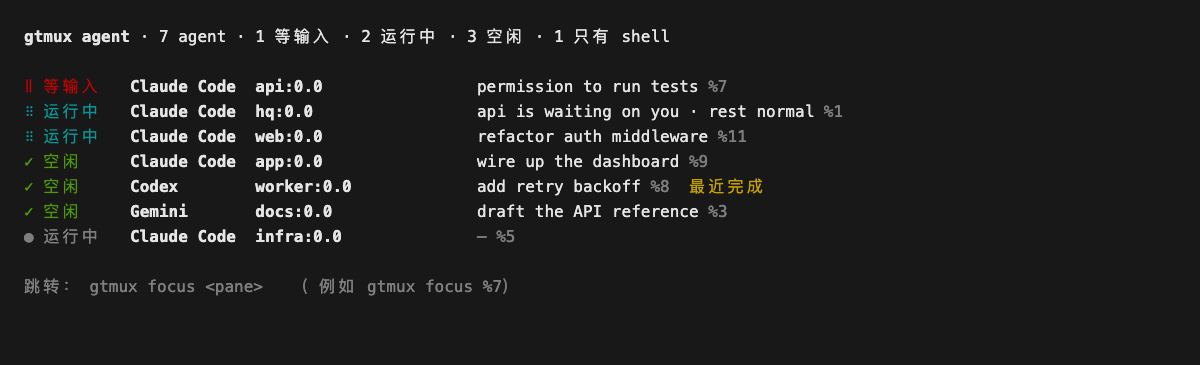
终端示例的文字版
gtmux agent · 7 agent · 1 等输入 · 2 运行中 · 3 空闲 · 1 只有 shell

‖ 等输入   Claude Code  api:0.0                permission to run tests %7
⠿ 运行中   Claude Code  hq:0.0                 api is waiting on you · rest normal %1
⠿ 运行中   Claude Code  web:0.0                refactor auth middleware %11
✓ 空闲     Claude Code  app:0.0                wire up the dashboard %9
✓ 空闲     Codex        worker:0.0             add retry backoff %8  最近完成
✓ 空闲     Gemini       docs:0.0               draft the API reference %3
● 运行中   Claude Code  infra:0.0              — %5

跳转:gtmux focus <pane>   (例如 gtmux focus %7)
从另一台电脑操作时,在那台电脑安装 CLI,执行主机上 gtmux pair 打印的 gtmux attach '…' 命令。以后用 gtmux attach <host> 选择 pane。按 Ctrl-] 或 tmux 的 Ctrl-b d 断开,远端会话继续运行。远程终端操作。
需要跨会话摘要时,运行 gtmux digest;需要一个 agent 协调任务时,运行 gtmux hq,它使用你已安装的 agent CLI 和对应账号。用 HQ 协调任务。
Mac 菜单栏:打开等待回复的会话
运行 gtmux app,点击菜单栏标记或按 ⌘⌥G 打开面板。选择 tmux agent,即可切到对应终端 pane。桌面通知也能打开对应 pane,需要 App 保持运行,并允许 macOS 通知。
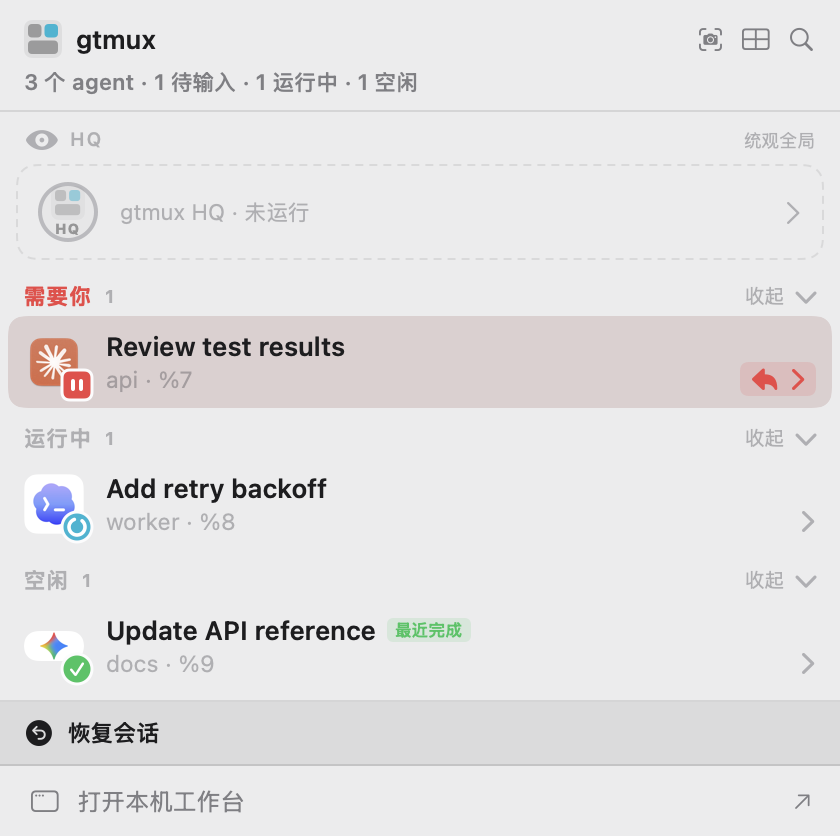
图为 2026-10-30 使用示例会话采集的原生菜单栏,底部可以打开浏览器工作台。按 ⌥⌘4 可以截图、标注并发送给 agent。菜单栏操作与会话跳转。
iPhone:离开电脑后回复
连上设备后,点雷达中的 agent,阅读对话或终端,选择给出的答案或输入回复。允许 iOS 通知后,可以在 agent 等你或完成时收到提醒。
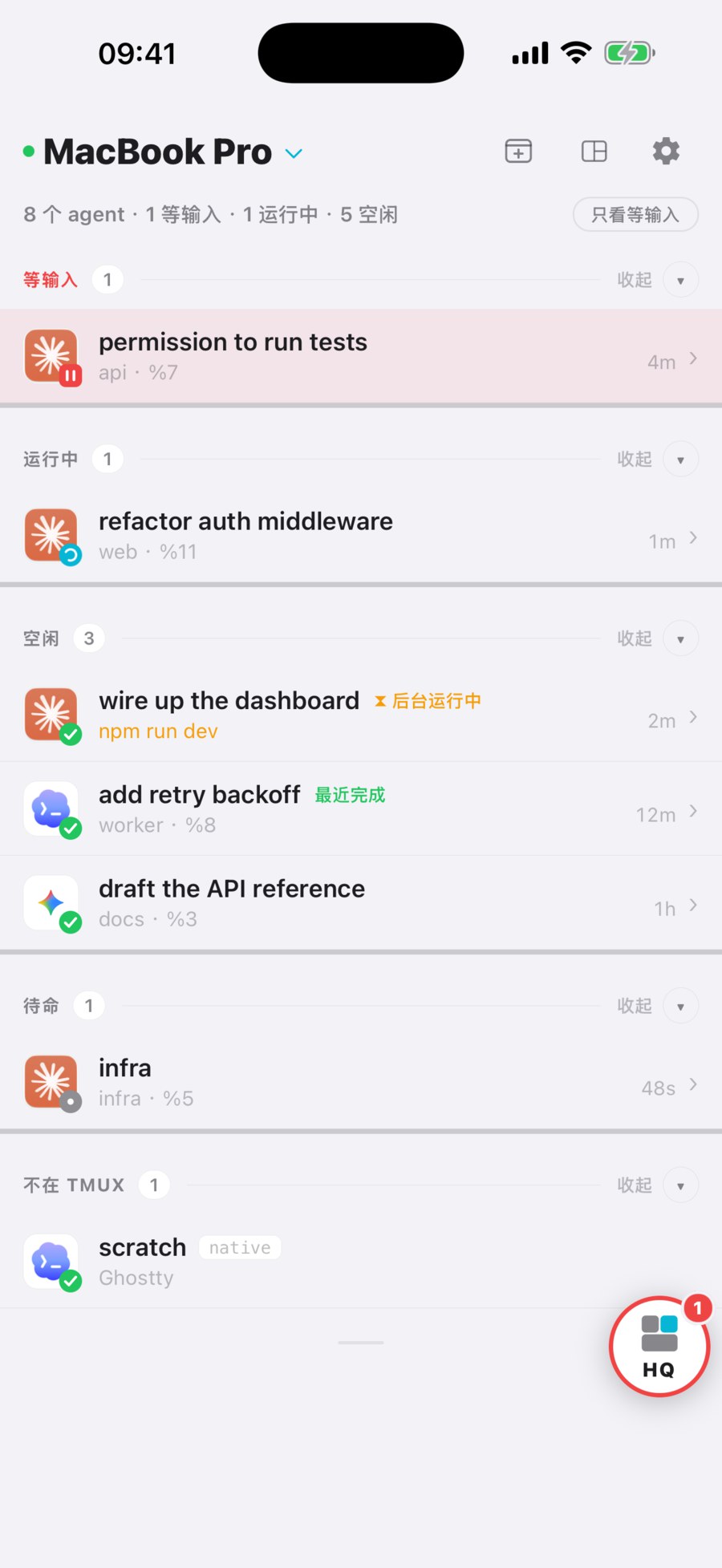
回复、附件、通知和协作者权限,见手机操作与分享。
iPad:并排查看会话
安装同一个 App Store App,为 iPad 生成新码配对。宽窗口下,雷达留在侧栏,选中的会话显示在主区。打开「所有 pane」还可以看到 shell 和编辑器;窄窗口使用手机布局。
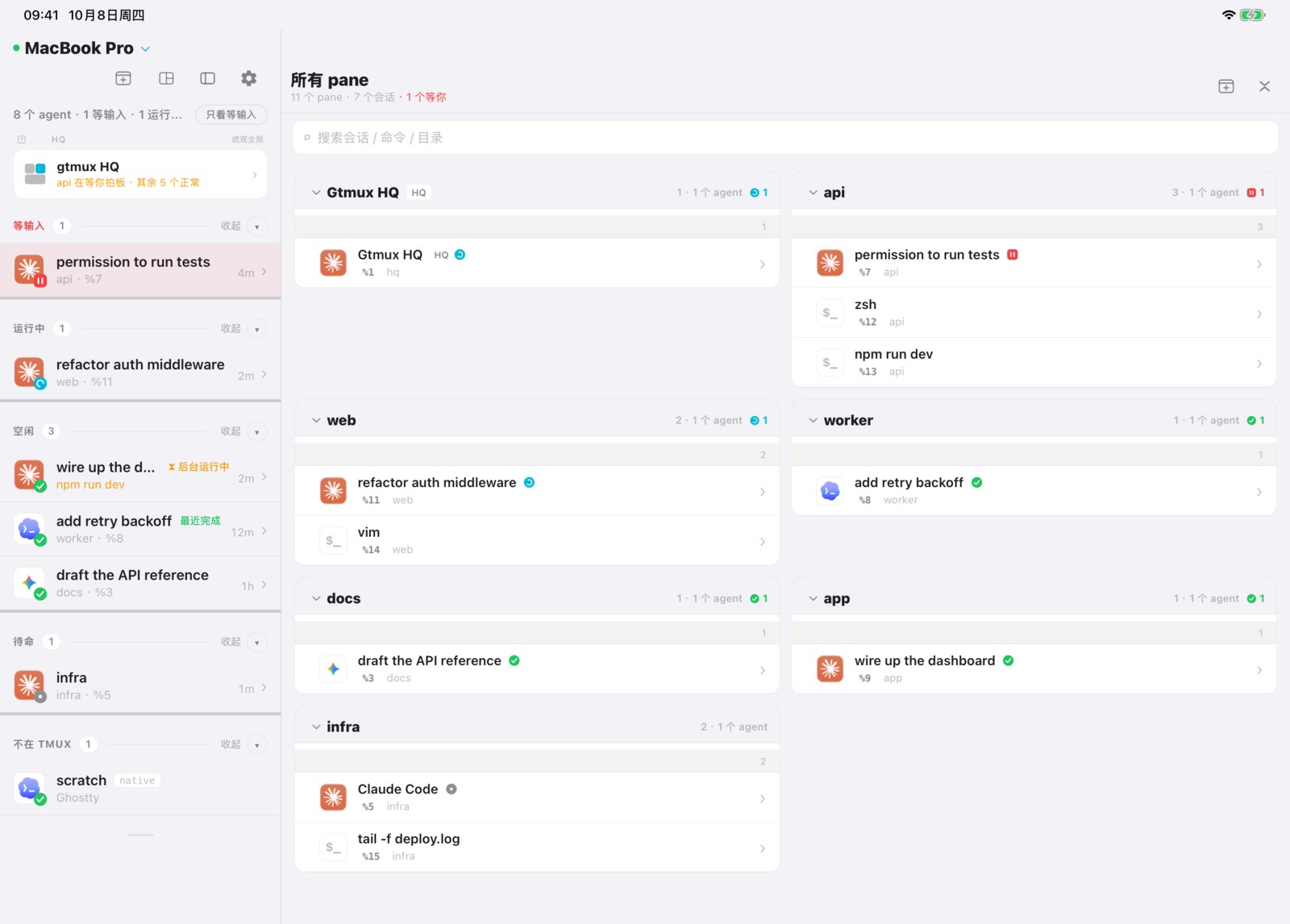
共用操作见 App 指南。iPhone 和 iPad 图使用 App 模拟器中的示例会话,采集于 2026-10-08。
Web:在浏览器打开工作台
在 Mac 菜单栏面板底部选择「打开本机工作台」,会在本机浏览器直接打开已配对的工作台,无需隧道。从另一台设备访问时,打开第 3 步生成的新浏览器配对链接。
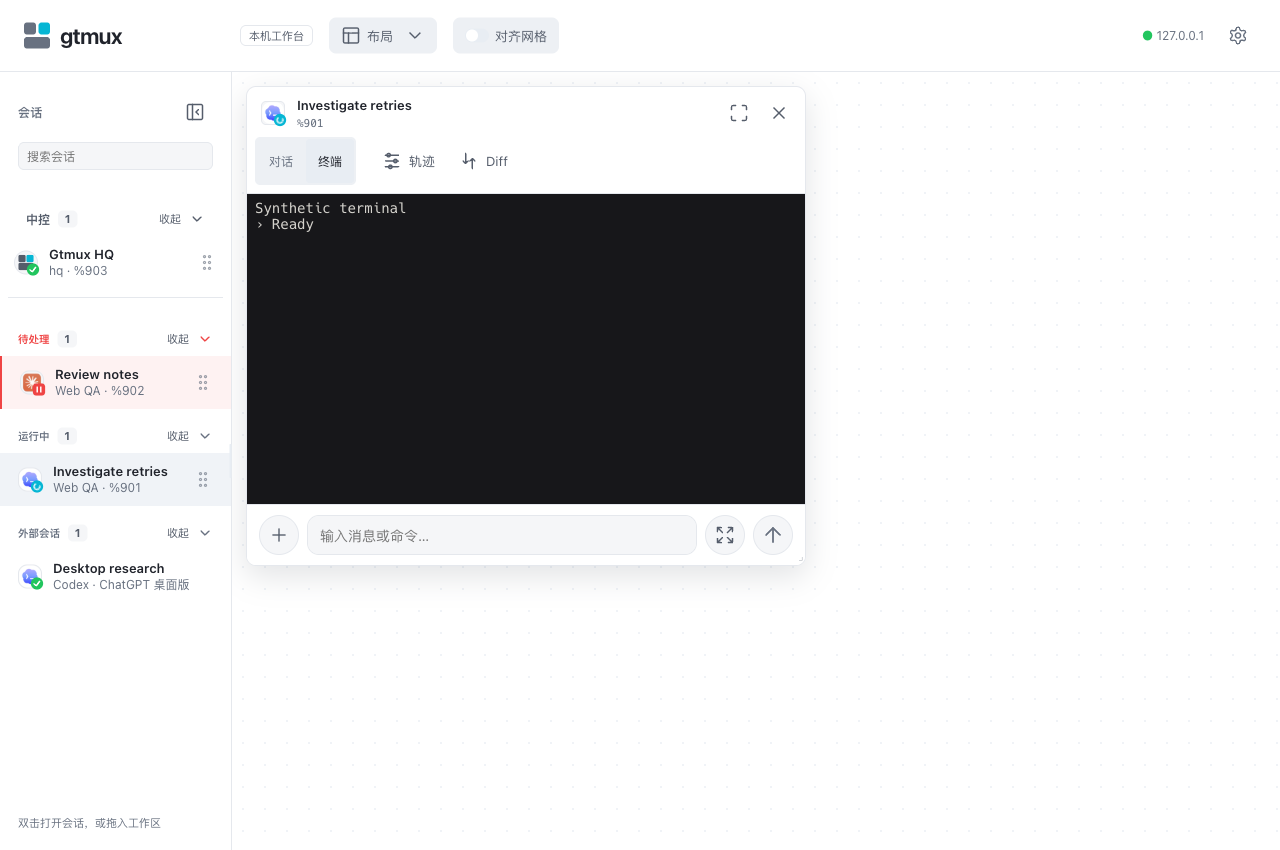
双击 tmux 行或将它拖入看板,再选择「对话」「终端」或「轨迹」。回车换行,Ctrl/Cmd+回车发送。支持读取的外部会话可以查看,但不能向 pane 输入。浏览器操作与布局。
按需查阅
- 安装、更新与卸载:PATH、Homebrew、指定版本和换 Mac。
- 连接排障:网络选择、常驻隧道、配对、权限与通知。
- Agent 接入与支持范围:hook、历史读取及各 agent 的边界。
- CLI 参考:命令参数、语言与持久设置。
- HQ 知识库:档案、知识和你自己的规则。
- DeepSeek Harness 接入:终端和历史集成。
参与开发可看 CONTRIBUTING.md 和设计文档。
许可
MIT © ccy
来源:README.zh.md(a457c28)· 在 GitHub 上编辑